



If you’re anything like me, one of the first things you do when you arrive at a new airport is search for free WiFi. It can be frustrating when there is no free WiFi available, and even more so when connecting to the network is a complicated process.
Free WiFi has become an expected amenity at airports, and Shanghai Pudong International Airport is one of those airports that offer this service. However, connecting to the WiFi network at this airport can be a bit more challenging than at other places, which is why we have put together this guide.
What You’ll Learn From This Article
- Step-by-step guide on how to connect to free WiFi at Shanghai Pudong International Airport (PVG)
- Where to locate the WiFi password machines within the airport
- What to do if you do not have a Chinese phone number
- Tips for accessing blocked websites and apps while in China
- Other ways to stay connected during your trip to China
How to Connect to Free WiFi at Shanghai Pudong Airport

Quick Answer: Does Shanghai Airport Have Free WiFi?
Yes, Shanghai Pudong International Airport (PVG) provides free WiFi for passengers. Connect to the airport network and verify your identity using a phone number, passport, or WiFi password machines located inside the terminal.
If you are traveling to China, keep in mind that some websites and apps may require a VPN or alternative connection method to work, so it is advisable to prepare in advance.
Accessing the Shanghai Pudong International Airport WiFi network is a bit different from many other international airports, but once you understand the steps, connecting becomes easy.
There are several methods to connect to the #AirportPVG-Free-WiFi network, depending on whether you have a Chinese phone number, an international number, or need to use the airport’s WiFi password machines.
Methods of Connecting to #AirportPVG-Free-WiFi
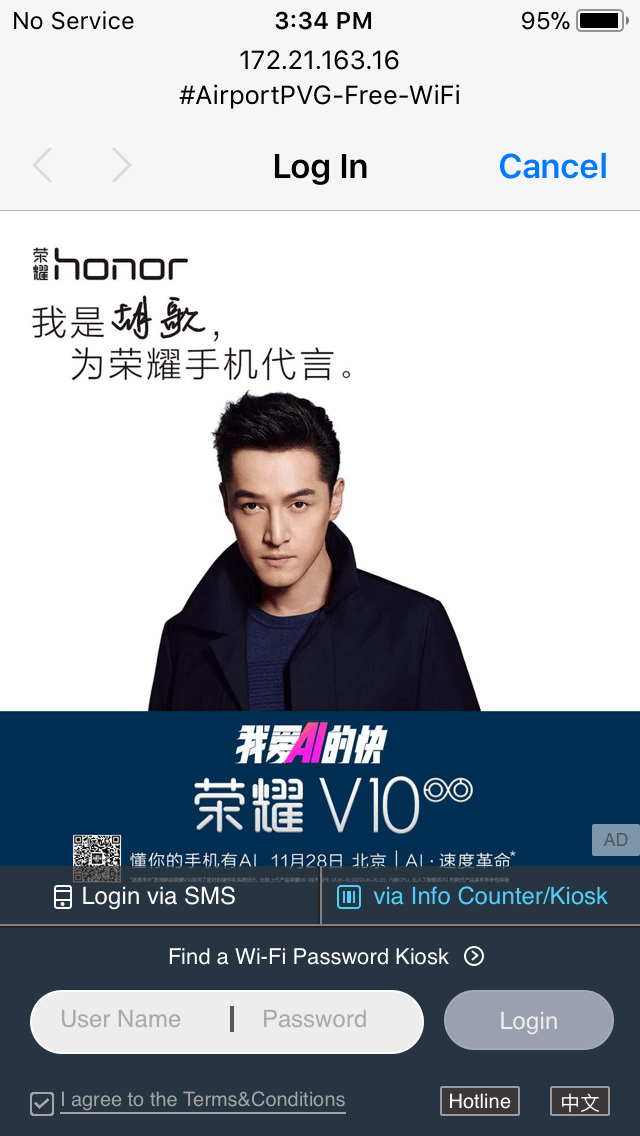
The WiFi network you should look for on your phone is #AirportPVG-Free-WiFi, and once connected, this network will be displayed.
At the bottom, there are a few login options. The first method is by SMS, the next is by passport verification, and the last is by a unique username and password.
Let us guide you through each method to ensure you stay connected when you arrive in Shanghai.
Method 1: Via SMS
This method only works if your phone’s SIM card can connect to a cellular network in China upon arrival. If you face issues, it may be due to not enabling international roaming.
This is considered the easiest method as all you need to do is enter your phone number and hopefully receive a text message with the login code.
Instructions are straightforward, requiring minimal explanation.
Top Tips for Traveling to Shanghai
Method 2: Via Passport Verification
This is a newer way to access the system and is useful if you do not have a Chinese phone number.
After selecting the WiFi network and opening the browser pop-up, choose ‘Passport Login’. You will be prompted to take a photo of your passport for verification and access to the complete WiFi network.
This method also accepts ID cards, Hong Kong and Macau travel permits, and foreign permanent resident permits.
Method 3: Via Username and Password

While this method may seem simple, it can be trickier for first-time visitors to Shanghai, especially if they do not speak the language.
Let’s break this down into two parts: arrival and departure.
Arriving at PVG
Upon landing in Shanghai, you will need to wait until after clearing customs and collecting your luggage to obtain a username and password. This means you can start the process only after exiting into the public arrivals hall.
There isn’t a traditional information desk; instead, there are machines near the exit door for automation and convenience.
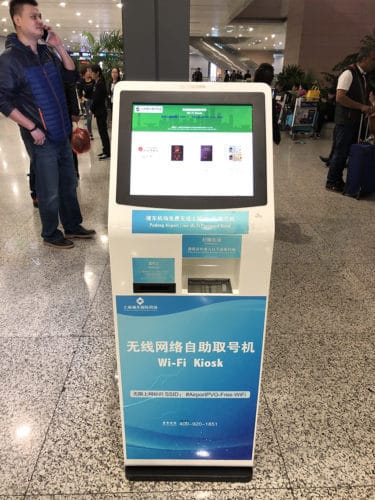
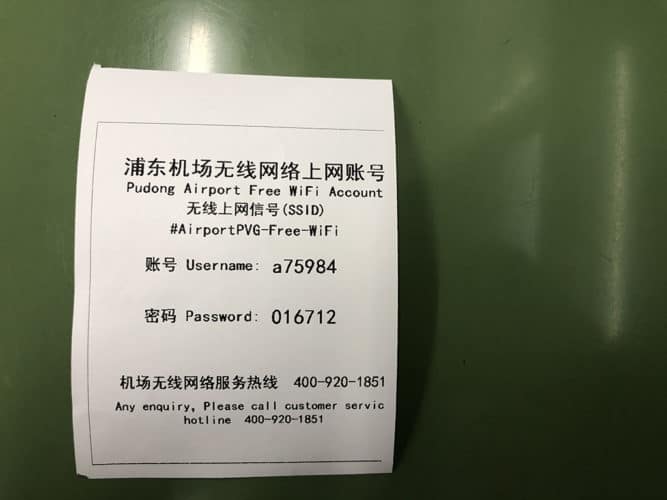
At the machine, switch the language to English and follow the instructions to scan your passport. Once scanned, a slip with the username and password will be printed from the machine, which you can use to log in.
Departing PVG
When leaving Shanghai, the process is slightly different, necessitating a new set of steps.
Similar to arrivals, you will need to locate a machine to print the login slip. The machine is situated between gates 75 and 77, which may be challenging to find without prior knowledge.

This machine differs from the arrivals one and appears to serve multiple functions. It may be challenging to switch to English, so we have provided a sequence of photos to guide you on the necessary steps.
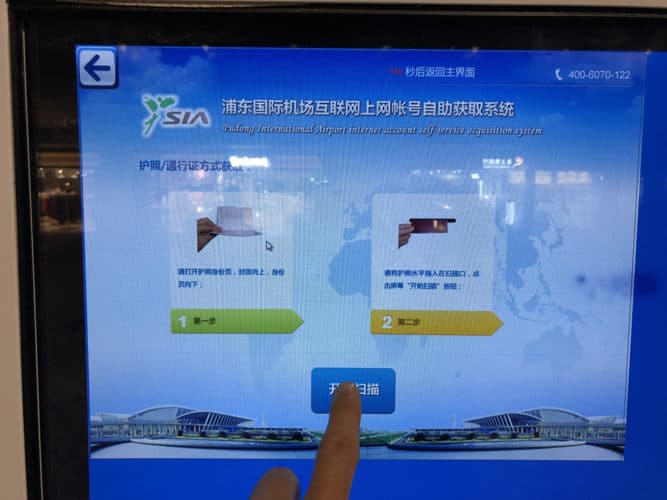
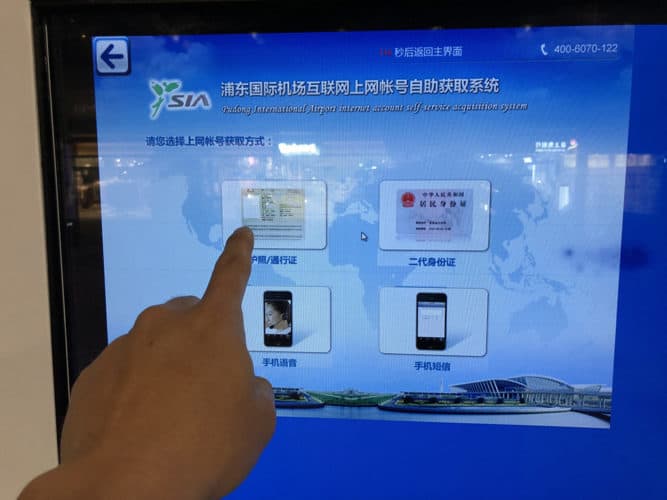

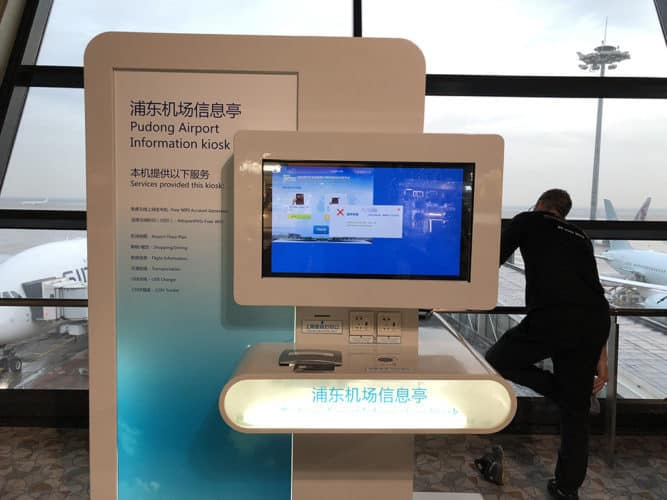
Essentially, you need to get the machine to scan your passport. Once verified, a slip with the username and password will be printed, allowing you to log in.
Be cautious while scanning passports, as we faced difficulties due to the scanner’s specific requirements. Placing the passport at the top left corner of the scanner is crucial for successful scanning.
Planning Your Time in Shanghai?

Once you are connected and ready to explore, Shanghai offers a mix of futuristic skylines, historic neighborhoods, traditional gardens, and exceptional food experiences in China.
Whether you have a short layover or a few days in the city, we have various guides to assist you in planning your visit. Begin with the top things to do in Shanghai to cover the highlights, find suitable accommodations in Shanghai with our neighborhood guide, or maximize your time with a budget-friendly 24-hour itinerary in Shanghai.
If your journey continues through China, do not miss our guide on visiting the Terracotta Warriors in Xi’an, one of the country’s most iconic historical sites.
Staying Connected at Shanghai Pudong Airport
Connecting to the internet at Shanghai Pudong International Airport can be confusing for first-time travelers in China, especially if they are accustomed to simple email-based logins. Fortunately, PVG offers free airport WiFi, and with a basic understanding of the system, connecting becomes straightforward. Whether utilizing the airport’s WiFi machines, a VPN, or alternative connection options like an eSIM, advance planning will ensure a smoother arrival or layover experience.
With a few simple steps, you can access the internet, communicate with friends and family, check travel plans, and continue your journey through China.
And there you have it! Hopefully, you can successfully connect to the WiFi at PVG. If needed, approach the airport help desk for assistance with accessing “free WiFi.” Best of luck!
Frequently Asked Questions
Yes, Shanghai Pudong International Airport (PVG) offers free WiFi for passengers through the #AirportPVG-Free-WiFi network. Travelers can connect using a phone number or passport verification method or by getting login details from one of the WiFi password machines inside the airport.
The easiest ways to get internet when traveling in China are using airport WiFi, buying a local SIM card, using an international roaming plan, or installing an eSIM before you arrive. If you need access to websites and apps that are restricted in China, make sure you set up any required tools before entering the country.
Yes, Shanghai Pudong International Airport has free WiFi available throughout the airport. Connect to #AirportPVG-Free-WiFi and follow the steps to verify your device before browsing.
Many major airports in China, including Shanghai Pudong International Airport, provide free WiFi for travelers. The connection process can vary by airport and may require identity verification through a phone number, passport scan, or WiFi access machine.
Google services, including Google Search, Gmail, and Google Maps, are restricted in China and usually cannot be accessed through regular internet connections. Tourists who need access to these services should research connection options and set them up before arriving.
To log into Shanghai Pudong Airport WiFi, select the #AirportPVG-Free-WiFi network, open your browser, and complete the verification process. You can receive a code by phone or use one of the airport WiFi password machines to get login details.
Travel Resources For Your Next Trip
If you are planning your trip and creating your itinerary, these are the best resources recommended by the Going Awesome Places team.
Credit Cards
Avoid hidden fees and unfavorable exchange rates with the Wise Card. Load it with the currency you need before your trip and use it like a regular VISA card. Keep track of your spending on the app and top up as required.

.jpg?w=150&resize=150,150&ssl=1 "This Liz Earle Cleansing Balm is the Secret to Achieving Radiant Skin")
